 |
MacEase |
|
|
More Info on These and Other Highly Rated Utilities
Other Reviews Parallel to USB Printer Adapter The Orb Drive -- Is it Worth the Wait? Cool Accessories For Your PowerBook
General Tips PCI Cards --
An Easy and Inexpensive Way to Expand the Power of Your
Mac Powerful Protection For Your Mac |
by Steve Becker
Company: Intego Hardly a day goes by that doesn't include a news item about some sort of Internet-related security threat. Fortunately for Mac users, many of these issues concern only PC users. However, Macs are not immune to security issues relating to worms, viruses, Trojan horses, and spyware. Further, Mac users can inadvertently forward some of these maladies to their friends' PCs. With virtually always-on broadband connections such as cable and DSL becoming the defacto standard for Internet connectivity, your computer is more susceptible to malware and to hackers. Using a router (especially one with a built-in firewall) affords some protection against hackers, and turning on OS X's built-in firewall is another way to get some protection from hackers. Unfortunately, both of these partial solutions don't provide the user-friendly interface, the customization options, the flexibility, the breadth of protection, and the additional features that are included in Intego's NetBarrier X4. In fact, NetNarrier provides considerably broader protection and features than is implied by its name. Yes, NetBarrier does include a powerful and easy-to-configure firewall, but Intego has integrated many additional protective features into NetBarrier that make it both an impressive and a comprehensive program for protecting your Mac!* Loads of Features 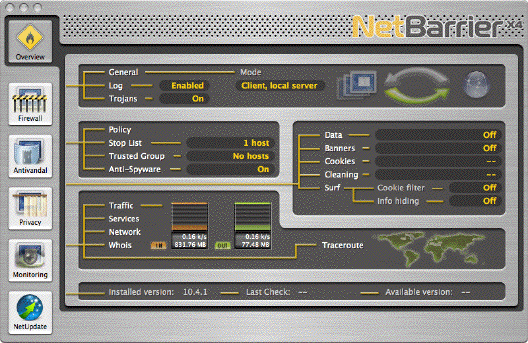 NetBarrier's main window provides a nice overview of the program's settings. Simply click on a button to view and customize all of the settings for that function. I especially like NetBarrier's easy-to-configure features that check both for spyware and for software that "phones home" without the users' knowledge or consent. Be careful, though, as some of the default configurations for NetBarrier do not turn on these features. After installing NetBarrier X4, I recommend that you go through the program's settings to make sure all the features that you want to be active actually are turned on. Some of the additional features included in NetBarrier X4 are the ability to monitor outgoing data for sensitive information (you let NetBarrier know what info to check for in its "Privacy" window), the ability to monitor and edit/control cookies (small files placed on your computer by some web sites), and the ability to set filters for eliminating annoying banners that appear on many web pages. Additionally, NetBarrier includes functions for managing the cache files and history files of many popular web browsers -- NetBarrier even lets you control which web sites are allowed to place cookies on your Mac. You even can use NetBarrier to "spoof" info about your computer so web sites that normally can't be accessed with a Mac will not recognize that you are on a Mac. Occasionally, web sites may try to track the last site you have visited, but NetBarrier provides an option to hide this information from a prying web site. What's especially nice is that NetBarrier makes it relatively easy to access and configure its myriad security and privacy features. Monitoring Made Easy Being easily able to monitor your computer's network activity provides another level of security because it enables you to observe suspicious activity, and monitoring network activity can be quite useful when troubleshooting network-related problems. And some users just find it cool to be able to monitor what's happening on their Macs. NetBarrier X4 excels in this area by displaying highly customizable and detailed information about virtually all types of network activity. NetBarrier's flexible display options include providing network activity information both in its main display window and in a much more detailed display that's accessed by clicking on the "Monitoring" button of its main window. Additionally, NetBarrier includes a separate monitoring utility that displays a small, floating window that contains a dynamic graphical representation of both inbound and outbound network activity -- this window also provides you with a numerical value for your network activity. There's even an option to display this info in the Dock (for users of 10.4, there's an option to display this info in a widget). NetBarrier's monitoring module also includes a Whois tool for looking up domain names and IP addresses, as well as a Traceroute function for looking up the routing of your data over the Internet. Working With NetBarrier X4 What's especially nice about NetBarrier is that its interface nicely integrates all of its functions and provides reasonably intuitive controls for customizing and working with its features. Still, some features have room for improvement. For example, with the Antivandal function enabled you are presented with an alert when a program that attempts to connect to the Internet is launched for the first time. NetBarrier's warning provides two options: "Deny" and "Allow." This is fine, but suppose you want to allow the program to connect with the Internet only for this session. If you read in great detail the very good PDF help file, you will see that holding down the Option key displays a button for this function. But rather than make the user find and remember this keyboard-based feature, why not just include this function as a third button in the alert window? Also, NetBarrier includes a reasonably extensive and customizable logging function. However, there is no option for controlling the size of the file, so it automatically overwrites its data every two or three days when its capacity has been reached. There is a preference item that allows this data to be exported and then cleared from the program's log, but it would be nice to have the option to keep the information within the program for quicker and easier retrieval. However, considering the breadth and depth of NetBarrier's features, I give it a very high overall rating for ease of use, its unobtrusive operation in the background, and the design of its interface! Prior to testing NetBarrier X4 on my G4 PowerBook, I had been using Symantec's Personal Firewall software. I uninstalled Personal Firewall before installing NetBarrier X4, and after installing NetBarrier X4, booting the PowerBook was noticeably faster. Further, while using NetBarrier X4, I could not detect it having any impact on the performance of the computer. Conclusion NetBarrier X4 includes so many features that I've been able to highlight just some of my favorites in this review. Intego has done an excellent job of integrating so many useful features into a single program, and this creates a compelling argument for buying NetBarrier X4 -- it's the best one-stop solution for Internet security issues that I'm aware of! And with an SRP of $69.95, it's an excellent value. Pros: Nice interface; easy-to-configure; provides comprehensive protection and features; highly customizable; has no apparent affect on system performance. Cons: Some default settings leave critical protective features turned off; some minor bugs; some log configuration settings should be more flexible.  4.5 out of a possible 5 Print It! and MacMagic can more than double the life of your ink cartridges and let you instantly mine just the information you want from any program and from the Internet! * It's highly recommended that you use an antivirus program along with a firewall/security program.
© 2006 by Steve Becker. All rights reserved. |
